Table of Contents
Project Development
Introduction
This chapter relates to Bloem's development process, showing how the main ideas behind the machine evolved over time to become a complete system. It begins with the ideation and conceptual stages, where initial sketches and preliminary designs are analyzed to show the transition from a creative vision to a functional solution. This is followed by a detailed design phase that includes the physical structure, smart systems and packaging.
To provide a clear view of the project, external programs, tables, and images are used to justify technical and material choices, including a fuctional analysis of the system's components. Finally, the chapter concludes with the prototyping stage and the tests performed to evaluate the final product.
Ideation
Choice of subject
The development of the project began with an initial selection phase, where we were presented with twelve potential themes covering a wide range of challenges. After an internal review, we narrowed the focus down to the three areas that best aligned with our intrests: Smartification of Everyday Objects (Smart Cities), Smart Health and Well-being (Smart Health), and Smart Marine Habitat Structures (Sustainable Environment).
Ultimately, we decided to proceed with smartification of everyday objects within the framework of Smart Cities. This choice was the result of strategic assesment of our teams's profile. As an international and interdisciplinary group, we recognized that our diverse backgrounds provided us with a unique combination of skills and technical knowledge. We concluded that the Smart Cities gave us the best opportunity to combine our knowledge and work together effectively to create a unique solution.
Brainstorming
Due to the broad nature of the Smart Cities theme, our initial brainstorming session generated a wide variety of ideas. After an initial screening, we focused our research on three specific concepts:
· A smart dehumidifier designed to collect ambient moisture and repurpose the water to automatically irrigate indoor plants.
· External facade panels aimed at improving the thermal insulation of buildings to mantain cooler temperatures more efficiently.
· A micro-break capsule specifically designed for employees to rest and recharge during work hours.
To organize our thoughts to evaluate these options, we used Miro, a collaborative digital tool that allowed us to visualize the pros and cons of each proposal. As shown in Figure 1, we mapped out the potential impact and technical feasibility of each idea.

After weighing the strenghts and weaknesses of each concept, we ultimately decided to move fordward with the micro-break capsule. We found that this area was the least explored compared to the others, meaning there was significantly less existing competition in the market. This provided us with a unique opportunity to combine our different skills into a single project that addresses a real gap in urban well-being, allowing us to create something truly original.

Design thinking
Once the micro-break capsule was chosen as our final concept, we moved into a Design Thinking phase to explore its phisical form. To do this, we developed five quick sketches, each representing a different approach to how the capsule could look and function. These initial ideas, shown in Figure 2, allowed us to visualize various layouts and user experiences.
· The Onion Pod: A private, fully enclosed room that prioritizes total insulation, though it requires a significant amount of floor space.
· The Wide Lounge: A large and spacious horizontal structure designed for maximum comfort, focusing on internal volume.
· The Minimalist Tipi: A practical and nature-inspired design that uses a minimalist aesthetic to create a calm, functional retreat.
· The Open Swivel: A cost-effective and compact chair system designed for very short breaks, though it lacks the privacy of a closed system.
· The Hanging Capsule: A smaller, suspended unit designed as a closed retreat, offering a sense of weightlessness while saving floor space.
As we did in the braisntorming stage, we carefully analyzed the pros and cons of each sketch. We considered factors such as user comfort, the space required in an office setting, and the tecnical feasibility of the structure.
After comparing the different designs, we ultimately chose the full-body capsule model. This design allows a person to step inside and remain standing, providing enough room to stretch, move slightly, or practice meditation in private. We decided that this spacious configuration was the most effective way to help users disconnect from workplace stress and focus on their physical and mental well-being.

The idea
The final concept developed for this project is an egg-shaped capsule, as shown in Figure 3, designed to integrate seamlessly into modern corporative environments, such as large halls or corridors. Our goal was to create a private sanctuary for “micro-breaks” during long working hours, a space where employees can scape the pressure of the office to perform a “power nap”, meditate, strech or even release tension in total privacy. The structure is dimensioned to be inclusive, providing enough space for a person to of average height to stand, lie down, or practice yoga confortably. A core principle of design is total isolation. The capsule is engineered to be both visually and acoustically opaque, ensuring that nothing can be seen or heard from the outside, and vice versa. This crates a true “break from the world” for the user. Functionality is also integrated into the exterior through a smart lighting system that iluminates when the capsule is occupied, signaling to others that the space is in use. Furthermore, Bloem is designed to be part of a larger digital ecosystem; it will be liked to a user interface for reservations and can provide helpful “newsletters” or guidance on mental healh and physical well-being. This ensures the capsule is not just a physical space but a proactive tool for workplace health.

Concept
This section details the conceptual framework of Bloem, outlining how various elements converge to create a private sanctuary for workplace well-being. The process begins with the definition of the corporate identity, where the development of the logo and color palette establishes a cohesive visual language. From there, the focus shifts to the evolution of the user interface, tracing the journey from the sketches to the final prototypes.
A central part of this visualization, is the integration of the capsule's physical design with its smart functionalities. Particular emphasis is placed on the occupancy signaling system and the structural aesthetics that allow Bloem to function as a seamless addition to corporate environments. By combining digital reservation tools with a specialized physical enclosure, the project is shaped into a dynamic solution for mental and physical health. Each component, from the external lighting to the internal ergonomics, contributes to the overall success and functionality of the platform.
Logo Design
The Bloem logo, shown in Figure 4, is designed to be simple and meaningful, combining three main ideas into one icon. A flower petal, a person meditating, and the letter “B”. By merging the human shape with the petal, the logo clearly shows our goal: helping people “bloom” and feel better at work. We used soft, rounded edges instead of sharp corners to make the brand feel safe and welcoming. This clean look works perfectly on everything from small phone screens to the side of the physical capsule, keeping the brand looking professional and modern.

Color Palette
Figure 5 gives insights of the Bloem color palette. It is designed to communicate a balance between professional stability and organic tranquility. By utilizing a range of desaturated, nature-inspired tones, the brand establishes a visual language that feels both sophisticated and calming. The identity relies on a specific hierarchy of colors that ensures the brand remains versatile while consistently evoking a sense of peace.
The lighter shades, Plaster and Mist, serve as the brand's primary background tones. They provide a clean, airy feel that represents openness and clarity, allowing the brand to exist comfortably within modern corporate aesthetics without appearing aggressive. These are complemented by the core botanical tones, Moss and Eucalyptus, which ground the identity in its natural roots. These greens are strategically chosen to symbolize growth and renewal, creating a “natural refuge” within the visual identity that invites the audience to slow down and breathe.
To complete the palette, Soot is used as the foundational anchor for typography and structural brand elements. This deep charcoal provides the necessary weight and high-end contrast, ensuring that the brand is perceived as premium, reliable, and professional entity. Together, these five tones create a harmonious ecosystem that reinforces the Bloem promise “a space where human well-being and professional life can coexist in perfect balance”.

Design
The design of Bloem centers on a philosophy of “Organic Minimalism”, where fluid shapes and high-performance materials work together to support the user's well-being. By stepping away from the sharp, rigid lines of traditional office furniture, we have created a form that feels naturally protective and inviting. This softer approach is more than just an aesthetic choice, it's a deliberate way to signal safety and relaxation the moment a person sees it.
The effectiveness of the design relies heavily on its materiality. Every surface and texture is chosen to create a true sensory escape, using advanced acoustic shielding to block out the noise and sustainable, tactile finishes to provide physical confort.
Structure
The skeletal framework of Bloem draws deep inspiration from traditional Japanese joinery, a craftsmanship philosophy that prioritizes the assembly of wooden structures without the use of nails, screws, or industrial adhesives. By relying on interlocking joints, the structure benefits from a superior level of durability and flexibility. Unlike rigid mechanical fasteners that can weaken wood over time, these traditional techniques allow the material to expand and contract naturally, ensuring a long-lasting structural integrity. As seen in Figure 6 the structural drawings, the capsule is built around a series of vertical wooden ribs that converge at a central ring. This “puzzle like” assembly that is both an engineering feat and a warm, organic alternative to industrial frames.
This structural choice is also fundamental commitment to sustainability and circular design. By eliminating metal fasteners and chemical adhesives, the capsule becomes a mono-material system that is significantly easier to disassemble and recycle at the end of its life cycle. This design ensures that each wooden component can be individually repaired or repurposed without damaging the rest of the frame, drastically reducing the project's carbon footprint. Ultimatelly, by merging ancestral assembly techniques with modern professional needs, the structure of Bloem stands as a durable, low-impact solution that respects both natural resources and high-quality craftmanship.

Materials
The choice of materials for Bloem is a tribute to Portuguese industruial heritage, prioritizing “kilometer 0” sourcing and high-performance sustanaibility. By utilizing local resources like cork and hemp, the project not only supports regional craftmanship but also achieves superior acoustic insulation through natural, breathable materials.
Theinterior is lined with cork tiles. Beyond the warm and organic aesthetic , these tiles provide excellent sound absorption, creating a soft, quiet atmosphere that is essential for meditation and rest. Following the layering system shown in the technical sketches, the exterior of the wooden frame is reinforced with hemp blocks. Known for their exceptional thermal and sound-proofing properties, these blocks act as a dense acoustic barrier, shielding the user from the high-frecuency noise of a busy office.
While the hemp blocks provide soundproofing, their raw appearance is elegantly concealed by an outer skin that defines the capsule's botanical silhouette. We are currently exploring sustainable fabrics and natural fibers for this decorative layer, seeking a material that is both durable and tactile. This outer shell will mimic the soft, overlapping curves of flower petals, ensuring that the capsule remains a beatufil piece of biophilic design while hiding the complex technical layers of insulation underneath. This combination of traditional materials and smart layering ensures that Bloem is as effective as it is respectful of the environment.
Structure
The structural drawings of Bloem illustrate a highly engineered system designed to balance formal elegance with technical performance. The assembly is built around a primary wooden skeleton, as detailed in Figure 6, wich utilizes a central compression ring to secure the vertical ribs. This radial configuration allows for a self-supporting dome structure that maximizes internal volume while maintaining a compact footprint within the office environment. By relying on traditional joinery as shown in the components of Figure 6, the frame remains flexible yet stable without the need for mechanical fasteners.
A key focus of the technical development is the multi-layered wall system shown in the details of Figure 7. The capsule's shell is composed of several functional layers designed for total acoustic isolation:

- Interior Skin: Aesthetic cork tiles for immediate sound absorption and tactile warmth.
- Insulation Layer: High-density hemp blocks that serve as a dense acoustic barrier.
- Outer Finish: A flexible decorative skin, currently in development, which gives the capsule its distinctive petal-like texture.
Furthermore, Figure 7 specifies a dual-door system and integrated “transpiration holes” in the wood panels to facilitate natural Air Flow. By placing openings on opposite sides, the design promotes passive ventilation, ensuring a constant supply of fresh air without compromising the soundproof integrity of the space. The synergy of these technical details demonstrates a design that is as functional as it is visually inspiring.

The final design, shown in Figure 8, features a single entrance with two door elements on the left and right side. These panels can be smoothly opened and closed, allowing easy access for the user. A ventilation concept is introduced in the user manual to improve the airflow. The interior incorporates cork elements as well as a cushioned seating area on the floor, enabling users to either sit or stand during different relaxation activities within the capsule. The middle layer consists of hemp-based panels, which are not visible from the inside or outside. These provide effective thermal insulation and sound reduction. The outer structure is made of plywood, which ensures stability and structural integrity. The final exterior finish consists of 3D-printed bloom-shaped panels, giving the capsule a high-quality appearance and making it suitable for office environments while enhancing user experience.


3D model with load and stress analysis
To validate the structural integrity of the Bloem pod, a static Finite Element Analysis (FEA) was performed using SOLIDWORKS Simulation. FEA is a numerical method that divides a structure into thousands of small elements and calculates how each element deforms and stresses under applied loads, allowing engineers to verify safety margins before physical construction begins. The analysis was carried out on the Bloem 3D model, which captures the egg-shaped shell panels, vertical wooden ribs, base ring, and interior seat platform.
Material and Setup:
The pod is constructed from birch plywood, modelled with the following properties: Elastic Modulus 11 GPa, Poisson's Ratio 0.3, Density 680 kg/m³, and Yield Strength 40 MPa. All surfaces were connected using Global Bonded contact, and the base ring was fully fixed to simulate the pod resting on a flat floor. Two loads were applied simultaneously: gravitational self-weight and a 1600 N occupant force on the seat. The 1600 N design load is derived from a 100 kg occupant with a 1.6× combined factor covering dynamic sitting impact and material variability, and exceeds the European furniture standard EN 1728 which specifies 1000 N. A curvature-based high-quality mesh with second-order tetrahedral elements was used to accurately capture the curved geometry.
Test 1 Results — Distributed Load:
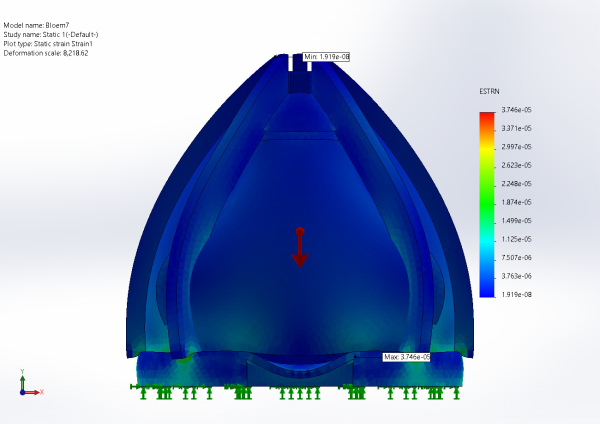
The maximum equivalent strain was 3.75 × 10⁻⁵, concentrated at the seat support region and 267 times below the elastic limit of birch plywood. The upper dome shows nearly zero strain confirming it is not load-bearing.
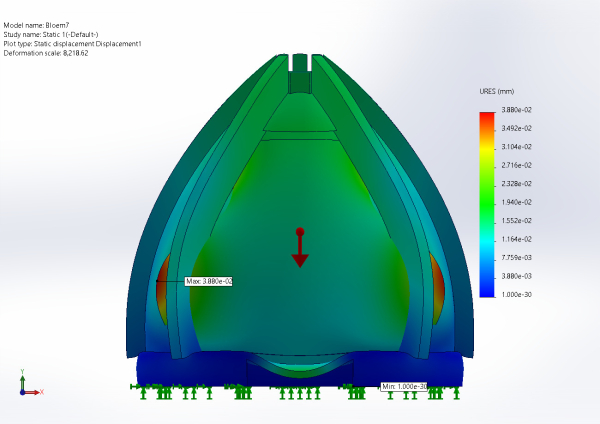
The maximum displacement was 0.0388 mm, less than half the thickness of a human hair and more than 100 times below the 5 mm threshold defined in EN 1728.
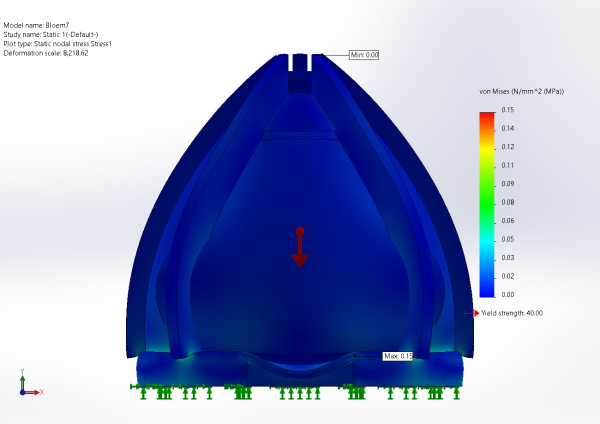
The maximum von Mises stress was 0.15 MPa at the base support region, representing only 0.375% of the material yield strength of 40 MPa, with no dangerous stress concentrations anywhere in the structure.

The minimum Factor of Safety was 261, more than 130 times the standard furniture target of 2.0. No region of the pod falls below a FoS of 5.
| Metric | Value | Limit | Verdict |
|---|---|---|---|
| Strain | 3.75 × 10⁻⁵ | ~1 × 10⁻² | PASS — 267× margin |
| Displacement | 0.0388 mm | 5 mm (EN 1728) | PASS — 129× margin |
| Von Mises Stress | 0.15 MPa | 40 MPa | PASS — 267× margin |
| Factor of Safety | 261 | 2.0 | PASS — 130× margin |
Test 2 — Worst-Case Concentrated Load:
A second simulation concentrated the full 1600 N onto a 200 × 200 mm patch at the center of the seat, representing the realistic contact area of a seated person. This produces a local pressure of 0.04 N/mm² and represents the most demanding loading condition for the seat structure. The patch was created using the SOLIDWORKS Split Line tool. The maximum von Mises stress under the concentrated load was 0.10 MPa, representing 0.25% of the material yield strength of 40 MPa. Stress dissipated rapidly through the surrounding rib structure with no dangerous concentrations elsewhere in the pod. The maximum displacement was 0.0367 mm, radiating outward from the contact zone while the base remained essentially stationary, confirming correct load transfer to the floor. The maximum equivalent strain was 3.649 × 10⁻⁵, tightly localised around the contact patch and fully within the elastic regime, meaning no permanent deformation occurs even under this demanding condition. The minimum Factor of Safety was 402, exceeding the standard furniture target of 2.0 by more than 200 times.
| Metric | Value | Limit | Verdict |
|---|---|---|---|
| Von Mises Stress | 0.10 MPa | 40 MPa | PASS — 400× margin |
| Displacement | 0.0367 mm | 5 mm (EN 1728) | PASS — 136× margin |
| Strain | 3.649 × 10⁻⁵ | ~1 × 10⁻² | PASS — 274× margin |
| Factor of Safety | 402 | 2.0 | PASS — 201× margin |
Color palette
The color identity of Bloem has been meticulously curated to foster a state of physiological and mental calm. The palette is composed of desaturated, nature-inspired tones that balance professional elegance with organic tranquility as shown in the Figure 5.
The strategic application of the palette is divided into three functional areas:
- Exterior Surfaces: The shades Plaster (off-white) and Mist (pale blue) are used for the capsule's outer shell. These tones allow the large structure to remain visually light and blend seamlessly into modern office environments without becoming a distraction.
- Interior Environment: The interior utilizes Moss and Eucalyptus greens as well as plaster. These shades are scientifically associated with stress reduction and focus. By surrounding the user with these deeper botanical tones, the capsule creates a “cocoon” effect that psychologically distances the user from the bright, high-pressure office atmosphere.
- Contrast and Accents: The shade Soot (deep charcoal) is used for structural details, hardware, and typography. This tone provides the necessary professional weight and high-end finish, ensuring that Bloem is perceived as a sophisticated tool for corporate wellness.
The synergy of this palette ensures that every touchpoint reinforces the brand's promise: providing a quiet, restorative space where users can truly “bloom.”
Smart System
Hardware
Figure 13 shows the block diagram of the capsule system. At its core is a microcontroller, which is connected to a RGB LED strip and light sensor. All components are powered by an external power supply. The microcontroller communicates wirelessly with an application via Bluetooth/Wi-Fi. The application acts as the central control hub, managing communication with the ESP32 and thereby controlling the lighting system. In addition, the app connects to a Bluetooth speaker to provide audio within the capsule.

To determine the most suitable components for the system, a comparative analysis was conducted. Multiple components were evaluated based on key parameters such as performance, functionality, and size. The following presents a comparison of microcontrollers (Table 1) and LED strips (Table 2). This comparison forms the basis for the final selection of components used in the project.
| Microprocessor | Arduino UNO R4 [1] | ESP32 Dev Module [2] | Raspberry Pi 4 [3] |
|---|---|---|---|
| Processor | 48 MHz | Up to 240 MHz | 1.8 GHz |
| Wi-Fi | IEEE 802.11 b/g/n (Wi-Fi 4) | IEEE 802.11 b/g/n (Wi-Fi 4) | IEEE 802.11ac (Wi-Fi 5) |
| Bluetooth | Bluetooth 5 | Bluetooth 4.2 / BLE | Bluetooth 5 |
| Power | 5 V DC via USB | 3.3 V DC via USB | 5 V DC via USB |
| Form factor | 68.6 × 53.3 mm | 51 × 28 mm | 85.6 × 56.5 mm |
| Feature | RGB LED Strip [4] | Single Color LED Strip [5] | Tunable White LED Strip [6] |
|---|---|---|---|
| Color Options | Color changing | Fixed | Adjustable white |
| Control | App / Microcontroller | On-off / Direct power | App / Microcontroller |
| Voltage | 5–12 V DC | 5–12 V DC | 5–12 V DC |
| Connections | 4 (R/G/B + V/GND) | 2 (+V / GND) | 3 (Warm / Cool + V/GND) |
| Notes | Can produce millions of colors | Simple and low cost | Mood adjustment with white tones |
Based on this analysis, we have chosen the ESP32 Dev Module. It offers a high processor speed and provides excellent flexibility for connecting sensors while still being compatible with the Arduino platform. Likewise, we want to give ourselves the option to use multiple colors of lighting in the capsule, which is why we have selected RGB LED strips. Below, we present a summary of all the electrical hardware components that will be part of the capsule.
Electrical Components Overview:
- 12 V Power Supply: Supplies power to the system and LED strip.
- Buck Converter: Steps down voltage for low-power components.
- RGB LED Strip: Enables flexible and dynamic lighting.
- Light Sensor: Adjusts lighting based on ambient conditions.
- ESP32 Dev Module: Provides control and wireless communication.
- 3 × Resistors (1 kΩ): Protects components and limits current.
- 3 × Transistors (IRLZ44N): Controls higher current to the LED strip.
- Speaker (Bluetooth): Provides audio output.
- Tablet: Acts as the user interface.
This section describes the schematic design of the system shown in Figure 14. The diagram illustrates the integration of the main components and their interactions. The ESP32 functions as the central controller and is responsible for controlling the lighting of the capsule. A light sensor is included to detect ambient light levels and determine when a session should begin. The capsule uses a 12 V RGB LED strip with four connections: a 12 V supply line and three control lines for red, green, and blue. The color and brightness are controlled using pulse-width modulation (PWM). Each control signal is generated by a digital output pin on the ESP32 and passes through a resistor and a logic-level N-channel MOSFET. This setup allows the low-voltage ESP32 to safely control the higher voltage and current required by the LED strip. Power is provided by a 12 V power supply. Since the ESP32 and sensor require a stable 3.3 V supply, a buck converter is used to step down the voltage accordingly. Additionally, the ESP32 communicates with a mobile application via Bluetooth Low Energy (BLE), enabling configuration and control of the system. It is important to note that this design represents an initial draft, developed to explore component selection and overall system integration.

To ensure the system operates reliably, a power budget was established for all electronic components. Table 3 below outlines the voltage, maximum current draw, and resulting power consumption for each component. The data is based on the datasheets of each component.
| Component | Rail | Max Current | Power (W) | Note |
|---|---|---|---|---|
| ESP32-WROOM-32 | 3.3 V | 500 mA | 1.65 W | During Wi-Fi activity |
| BH1750 Sensor | 3.3 V | < 1 mA | ~0.01 W | I2C communication |
| LM2596 Loss | 12 V | ~50 mA | ~0.6 W | Based on ~ 80 % efficiency |
| RGB LED Strip (3 m) | 12 V | 3.6 A | 43.2 W | Full white brightness |
| Total System | 12 V | ~3.8 A | ~45 W | Input requirement for J3 |
The power budget analysis shows that the system has an estimated total power consumption of approximately 45 W, where the RGB LED strip constitutes the primary load. In comparison, the ESP32 and connected sensors contribute only a minor portion of the overall consumption, while losses in the voltage regulation stage are relatively small but included in the calculation. Based on this analysis, the system requires a 12 V power supply capable of delivering at least 3.8 A. To ensure stable operation under varying load conditions, a safety margin should be applied. Therefore, a power supply in the range of 5–6 A (60–72 W) is recommended. Overall, the power budget confirms that the system design is r well-justified in terms of power requirements.
Software
The software component of the Bloem project is responsible for enabling the interaction between the user and the capsule environment. It consists of a mobile application installed on a tablet and an embedded control system running on a microcontroller. Together, these elements allow the user to book sessions, control environmental settings, and experience a guided relaxation process.
The tablet application acts as the main interface between the user and the system. It is designed with a calm and minimal user interface, using simple navigation, large touch elements, and soft visual feedback to align with the relaxing purpose of the capsule. The application allows users to quickly book a session, select a time slot, and adjust lighting and sound settings without unnecessary complexity.
The embedded system, implemented using a microcontroller (ESP32), is responsible for executing commands received from the tablet application. It controls the lighting system, manages audio triggers, and processes sensor data when necessary. This separation between interface and control ensures modularity and simplifies both development and maintenance.
Use Cases and User Stories
The Bloem system supports a set of focused interactions that define the user experience, which are explained in Table 4.
| Use Case | Description | Main Actor |
|---|---|---|
| Book a session | The user selects a session duration and an available time slot | User |
| Start session | The user initiates the relaxation session | User |
| Adjust lighting | The user changes brightness or selects a predefined lighting mode | User |
| Adjust sound | The user selects a sound environment or silence | User |
| Run session | The system maintains the selected environment during the session | System |
| End session | The session ends automatically or is stopped manually | User / System |
Table 5 highlights the user stories.
| ID | User Story |
|---|---|
| US1 | As a user, I want to quickly book a session so that I can relax without waiting |
| US2 | As a user, I want to choose a time slot so that I know when the capsule is available |
| US3 | As a user, I want to control lighting so that I can create a comfortable environment |
| US4 | As a user, I want to select sounds or silence so that I can personalize the experience |
| US5 | As a user, I want a simple interface so that I can use the system without confusion |
| US6 | As a system, I want to automatically end sessions so that the capsule is available for the next user |
Selection of Development Platforms and Software Components
The Bloem system requires both a front-end application and an embedded control system. Different options were considered for the tablet application shown in Table 6.
| Option | Advantages | Disadvantages | Suitability |
|---|---|---|---|
| Native Android application | Full access to device features, high performance, stable user experience | Platform-specific development | High |
| Cross-platform mobile framework | Faster development and shared codebase | Additional abstraction layer, possible performance trade-offs | Medium |
| Hybrid application | Easier UI development, flexible design | Limited hardware integration, less optimized | Medium |
For Bloem, a native Android application is considered the most suitable option. It allows direct integration with the tablet hardware, ensures smooth performance, and provides better control over the user interface and device communication.
The selected software components are summarized in Table 7.
| Component | Technology | Purpose |
|---|---|---|
| Tablet application | Native Android app | User interaction and session control |
| UI design | Custom interface (Bloem design system) | Calm and intuitive experience |
| Embedded firmware | ESP32 (Arduino framework) | Hardware control and system logic |
| Communication | Wi-Fi and Bluetooth local communication | Data exchange between tablet and ESP32 |
| Session management | Internal app logic | Controls timing and session flow |
Software Architecture
The software architecture is divided into two main layers: the user interface layer and the hardware control layer.
The tablet application manages all user interactions, including session booking, environment configuration, and session control. Once the user selects a session and its parameters, the application sends commands to the embedded system.
The ESP32 receives these commands and applies them to the physical lighting component. During the session, the system maintains the selected environment and ensures that the session duration is respected through a timer mechanism.
This architecture ensures a clear separation between user interaction and hardware control, making the system easier to develop, test, and extend.
Interaction Diagram
Figure 15 illustrates the interaction between the user, the tablet application, and the hardware components of the Bloem system.

Packaging
Given the significant scale of Bloem and its commitment to sustainable logistics, the packaging is designed as a high-end, industrial Flat-Pack System. Instead of shipping a voluminous, pre-assembled structure, the capsule is divided into modular components that optimize transport space and significantly reduce the carbon footprint of delivery. This system is specifically engineered for professional B2B handling, ensuring that all large-scale vertical ribs and delicate acoustic layers are protected during transit to corporate environments. The packaging utilizes heavy-duty, reinforced recycled kraft liners with a structural internal framework that mimics the protection of traditional wooden crates used for fine furniture, yet remains entirely plastic-free and recyclable. As shown in Figure 16, each component is nested within custom-molded pulp inserts that secure the cork tiles and hemp blocks, while the exterior of the crate serves as both a technical manual and a brand statement. Using monochromatic, eco-friendly inks, the surface displays the assembly hierarchy and the structural logic of the project, providing immediate visual guidance for the professional installation team. Centered prominently on the main face of the packaging is the brand’s core promise: “Space to breathe, room to bloom.” This serves as the final touchpoint of the delivery process, signaling that once the industrial protection is removed, what remains is a sanctuary designed for professional clarity and personal growth.

Prototype
Structure
The prototype was developed based on the principles of the 3D model. It was designed as a puzzle-like construction that could be assembled without the use of nails. During the planning phase, the intention was to create a full-scale replica of the 3D model, including all insulation layers and the wooden exterior of the capsule. However, this proved to be too ambitious within the available time and resources. As a result, the decision was made to complete the prototype using paper instead of wood for the outer shell. Consequently, a significant amount of the originally ordered materials remained unused. The prototype was built at a scale of 1:6,25. This scale was chosen because it matched the dimensions of the wood that had been purchased for the project and fits the budget of the materials for the prototype. In figure 17 below, the wooden framework of the prototype can be seen, which was constructed first. It fits together like a puzzle. The capsule’s hardware is integrated into the base, where it controls the lighting and audio system through an app.

As a next step, the outer shell of the capsule was added, as shown in Figure 18. Initially, thin wooden panels were considered to replicate the intended final design. However, during the prototyping process it became evident that the wood was difficult to bend into the required curvature. Various bending techniques were tested, but the material either failed to maintain its shape or cracked under stress. As a result, cardboard was selected as an alternative material for the prototype. The cardboard panels were attached to the wooden framework using staples, allowing the curved geometry of the capsule to be represented accurately while reducing manufacturing complexity. Although this differs from the final design, where the wall panels are intended to be inserted into the base floor and structural ribs, the prototype successfully demonstrates the overall shape, construction principle, and assembly concept of the capsule.

As a final step, an insulation layer was planned to be integrated into the prototype in order to represent the acoustic concept of the final product. Since the intended materials, namely hemp insulation and cork panels, would have significantly exceeded the available prototype budget, bubble wrap was selected as a low-cost substitute. Although it does not provide the same acoustic performance, it allows the insulation layer and wall composition of the capsule to be demonstrated visually. At the time of writing this report, the bubble wrap had not yet been delivered and therefore could not be installed. The material will be added to the prototype as soon as it becomes available. Several elements of the final design were intentionally simplified or omitted from the prototype due to limitations in time, budget, and available resources. In particular, the sliding door and its guiding mechanism, as developed in the 3D model, were not implemented. Manufacturing a functional door system would have required additional materials, increased construction complexity, and exceeded the scope of the prototype phase. Similarly, the seating area and interior cushioning were not included. The available space inside the prototype was reserved for the installation and testing of the LED lighting system, which was considered a higher priority for demonstrating the intended user experience. Despite these simplifications, the prototype successfully validates the overall dimensions, structural concept, assembly process, and visual appearance of Bloem. It therefore serves as an effective proof of concept and provides a solid basis for future iterations incorporating all planned features of the final product.
Hardware
Regarding the prototype’s hardware, the primary focus has been to integrate a reliable and functional LED-based light source. To enable user control of the lighting in Bloem, a client–server architecture was implemented. In this setup, the ESP32 operates as a client, communicating with a server defined within the application. The client receives commands from the server, which processes user input from the app and returns responses that change the color of the LED. Figure 30 shows the data flow.

This architecture ensures separation between the user interface and the hardware layer, allowing for scalable and flexible control. As a result, a fully functional prototype was developed, where the lighting inside the dome can be controlled by the user through the application.
In Figure 20 below, the prototype of the LED strip is shown. A main on/off button has also been included, allowing the system to be controlled with a single switch. When the system is turned on, a green LED indicates that it is active and functioning correctly.

The client receives commands from the server in a simple string-based message format, for example: message = “RGB:255,0,0\n”. In this case, the LED will only emit red light, as the red value is set to 255 while the green and blue values are set to 0. The client code reads the incoming message by checking if it starts with the “RGB:” prefix. It then extracts the red, green, and blue values from the string and converts them into integers, which are used to control the LED output. The code developed in the Arduino IDE is included in the Deliverables section.
Software Implementation and Code Flowcharts
The Bloem application was developed as a native Android tablet app. The app is responsible for the main user interaction, including booking a session, browsing available environments, starting or ending a session, and controlling the capsule atmosphere. This solution was chosen instead of a website because it provides a more stable experience on the tablet and allows easier integration with local functions such as sound playback and hardware communication.
The prototype software is divided into two main parts. The Android app manages the interface, session logic, timer, and audio playback through a Bluetooth speaker. The ESP32 is responsible for controlling the LED lighting system. Communication between the app and the ESP32 is done through Wi-Fi using TCP commands.

In the above Figure 21 the flowchart shows the session booking process. The user opens the app, selects “Book a Session”, chooses the session duration and time slot, and confirms the booking if the selected slot is available. If the slot is unavailable, the app displays an error message and allows the user to choose again.

In the above Figure 22 the flowchart shows the session control and environment flow. When an active booking exists, the user can choose an environment preset, such as Calm, Ocean, Rain, or Energetic. The app then manages the session timer, plays the selected sound through the Bluetooth speaker, and sends lighting commands to the ESP32.

In the above Figure 23 the flowchart shows the TCP communication used for LED control. When the user selects a color, the app converts it into RGB values, creates a command string, connects to the ESP32, sends the command, and waits for an acknowledgement response. If the response is valid, the app updates the interface as successful; otherwise, it displays an error.
Overall, the flowcharts explain how the app separates the user experience from the hardware control. The tablet application handles interaction and audio, while the ESP32 manages the physical lighting system inside the capsule.
Tests & Results
Hardware tests
The hardware tests specified in Tests are presented in the table. As shown in Table 8, some of the functional tests for the hardware components were not implemented in the prototype and were therefore not tested. We have tested all the features that were implemented, and these passed. We prioritized implementing the lighting system in the prototype and only simulated the acoustic functions by adding layers to the structure.
However, due to limited access to appropriate materials, we did not achieve a fully soundproof capsule. In addition, the prototype does not include a functional door, which also affects acoustic performance.
| Functionality | Test Result |
|---|---|
| F1 – External speech is noticeably reduced inside the capsule | Not tested |
| F2 – Sound from inside is not clearly understandable outside | Not tested |
| F3 – LED responds to app control | Pass |
| F4 – Response time is within 1–2 seconds | Pass |
| F5 – No visible flickering during operation | Pass |
| F6 – Light feels comfortable for users | Pass |
| F7 – Sufficient air circulation is maintained | Not tested |
| F8 – Users feel comfortable while using the space | Pass |
Software tests
Software Tests
The Bloem mobile application was tested through functional, performance, and usability tests. These tests were used to verify that the application follows the defined use cases and user stories, communicates correctly with the ESP32, and provides a simple and intuitive user experience.
Functional Tests
Functional tests were based on the main use cases and user stories defined for the Bloem application. Each function was tested manually on the Android prototype to check whether the expected app response and hardware behaviour occurred correctly.
| Test ID | Related Use Case / User Story | Test Description | Expected Result | Status |
|---|---|---|---|---|
| FT1 | Book a session | User selects session duration and available time slot | Booking is confirmed and session is saved | Passed |
| FT2 | Book a session | User selects an unavailable time slot | App displays an unavailable message and asks the user to choose again | Passed |
| FT3 | Start session | User starts a booked session | Session timer starts and environment options become available | Passed |
| FT4 | Choose environment preset | User selects Calm, Ocean, Rain, or Energetic | Correct sound and lighting preset is selected | Passed |
| FT5 | Set LED color | User selects a light color in the app | RGB command is sent to ESP32 and LED color changes | Passed |
| FT6 | Control sound setting | User selects a sound option | Audio plays through the tablet and Bluetooth speaker | Passed |
| FT7 | End session | User ends the session manually or timer expires | Audio stops and LED system is reset or turned off | Passed |
| FT8 | Connection error | ESP32 is unavailable during LED command | App displays an error message and does not crash | Passed |
Performance Tests
Performance tests focus on the communication between the Android app and the ESP32, as well as the responsiveness of important app operations. Each critical operation was repeated in order to calculate the average runtime and standard deviation.
| Test ID | Operation | Data Exchanged | Repetitions | Metric Measured | Average Result ($\mu$ ms) | Standard Deviation ($\sigma$ ms) |
|---|---|---|---|---|---|---|
| PT1 | Send LED color command to ESP32 | 21 B (RGB command + ACK) | 10 | Runtime / latency | 76.90 | 15.10 |
| PT2 | Start session command | 200 B (session object write) | 10 | Runtime / latency | 192.30 | 31.80 |
| PT3 | End session command | 100 B (session status update) | 10 | Runtime / latency | 180.00 | 30.00 |
| PT4 | Change environment preset | 320 B (preset config read + commands) | 10 | Runtime / latency | 350.00 | 70.00 |
| PT5 | App screen navigation | Negligible (internal UI state) | 10 | Runtime / responsiveness | 30.00 | 5.00 |
Summary
The prototype demonstrates a functional and well-integrated system combining both hardware and software components. The structural design reflects the intended capsule form, while the LED lighting system, controlled through a client–server architecture, operates as expected. The Android application provides an intuitive user interface, enabling session booking, environment selection, and real-time control of lighting and sound.
Although some elements of the design were simplified or not implemented due to limitations in time, budget, and materials, the prototype still successfully validates the core concept and key functionalities of the system. Both hardware and software testing indicate that the implemented features perform consistently and meet the defined requirements.
This leads to the final discussion of the project, where the achievements, limitations, and future development will be presented.